Friday, August 24, 2018

We’ve used the Pocophone, but all we have are Pixel 3 XL leaks | #PNWeekly 319

Hey everyone! Hope you're enjoying your Pixel 3 XL phones out there. Now that you've bought one, what do you-wait, hang on. You mean to say that they haven't gone on sale yet? Then why the hell does everyone in the world have one except us!? Gosh, we're so thirsty.

Meanwhile, Huawei's up to its old DSLR tricks again while new renders of one of its future phones surface. Will this year's iPhones hurt next year's? Is a Nokia phone the best one you can get out there? All these questions may or may not be answered, but we'll definitely tell you about a Xiaomi phone you should be watching out for on this episode of the Pocketnow Weekly!

Watch the YouTube video recorded at 1:00pm Eastern on August 23rd or check out the high-quality audio version right here or through AppleGoogle, our RSS and wherever you get your podcasts. Talk back live while you're watching the show on Twitter with #PNWeekly and shoot feedback to the hosts at podcast@pocketnow.com!


from xda-developers https://ift.tt/2ML23bK
via IFTTT

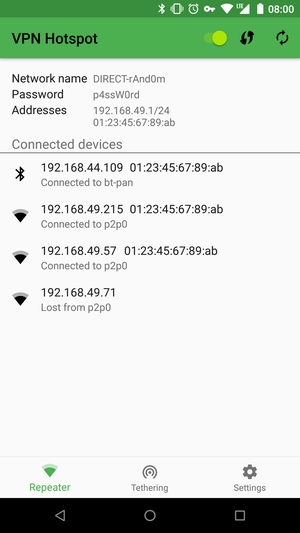
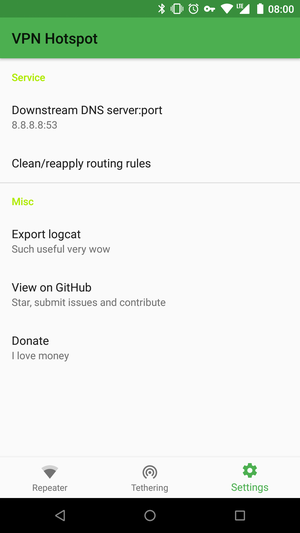
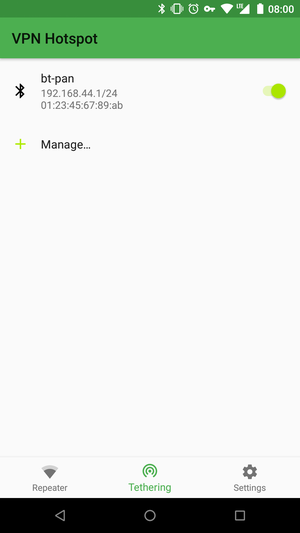
VPN Hotspot lets you share your VPN connection over a hotspot

VPN Hotspot

There are a lot of people who worry about the privacy of their online activity these days. Companies are releasing entire web browsers that focus solely on blocking the countless number of trackers that companies have embedded into their websites. Then we have internet providers who try to snoop in on what you're doing, there are hackers who scan through entire publish WiFi networks, and so much more.

This is a big reason why the VPN business is getting so popular these days and getting one for everyone in a house, or all of your friends, can get quite expensive. Thankfully, XDA Senior Member Mygod Studio has released a free application called VPN Hotspot which lets you share your current VPN connection to people near you by using a hotspot/system tethering or repeater (root required).

The goal of Mygod Studio was to design a VPN Hotspot to do only minimal changes to your system. This results in there being almost no chance you will brick your device while also limiting the risk of breaking your Internet using this app (under normal conditions). However, anything is possible when tinkering with these types of things so the developer cannot guarantee that nothing bad will happen. For those curious about what is under the hood of VPN Hotspot, be sure to check out the GitHub project here, but here are a number of reasons why VPN Hotspot can be quite the useful application.

  • Connecting things that don't support VPN like Chromecasts behind corporate firewalls
  • Setting up gapps behind corporate firewalls
  • Connecting to your mobile hotspot but you're not bothered to set up VPN on your device
  • Bypassing tethering limits. (you might need more of a real VPN than an ad-blocker to fool a smarter cellular provider)

VPN Hotspot (Free, XDA Labs) →


from xda-developers https://ift.tt/2BJQKw7
via IFTTT

Android Pie-based HydrogenOS Beta 2 for the OnePlus 6 brings September security patches

android p oneplus 6 oxygenos 5.1.11

HydrogenOS is a Chinese ROM by OnePlus that runs on almost all of their devices. The main difference between HydrogenOS and OxygenOS is that HydrogenOS doesn't come with Google services, such as the Play Store and others. But, it has a history of receiving updates earlier than OxygenOS. Just now, it received Android Pie-based 2nd beta for OnePlus 6, which brings September security patches.

User harshitguliani posted on OnePlus forums about the update. He attached the screenshot where we can see the full changelog of the build.

As you can see, the update contains a bunch of bug fixes, along with the September security patches. The first beta version was already more stable than the Android P Developer Preview builds, so the second beta should be better as it's more optimized. It also contains OnePlus' proprietary features and tweaks.

If you're already running HydrogenOS Beta 1, then you should have already received the OTA update. If you're running OxygenOS or any other custom ROM and want to try Google-less Android Pie-based HydrogenOS Beta 2, then follow the link below to download the zip file and flash it via TWRP.


Download Android Pie-based HydrogenOS Beta 2 for the OnePlus 6 [Warning: Large File Download]
Via: OnePlus Forums


from xda-developers https://ift.tt/2wbkjBA
via IFTTT

Asus ZenFone 5Z update adds Lift to Face Unlock, RAW capture, & EIS/OIS auto switch

ASUS ZenFone 5Z

The Asus ZenFone 5Z is one of the many cheap Qualcomm Snapdragon 845-powered smartphones available on the market today. It's being hailed as a OnePlus 6 competitor, not just in price, but in performance as well. The company is supporting it well enough so far, and an update has come out which offers a huge number of camera improvements. These include RAW capture support, EIS/OIS switching, and panorama mode. On top of that, there are some new features as well such as a lift to face unlock. You can check out the full changelog below.

Asus ZenFone 5Z update adds a number of brand new features

12 New Functionalities

  • Lift to Face unlock
    • No need to press the power button to wake and face unlock
  • Gesture Controls incorporated

10 New Camera Functionalities

  • Live Filters enabled in the camera
  • Enable RAW file support
  • Enable Panorama feature
  • Support Auto anti-flicker feature (Phone will auto-detect electricity frequency based on lighting condition and switch the frequency setting between 50 Hz and 60 Hz to prevent flickering)
  • Add on/off button for EIS
  • Enable flash in Pro mode
  • Support EIS feature in FHD@60FPS & 18:9@30FPS
  • Support EIS/OIS auto switch feature during video recording (The Camera will switch to either OIS or EIS to take super smooth videos depending on conditions)
  • Support overheat detection in video recording mode (Mainly useful while recording)
  • Support 3 Dimensional Noise Reduction feature also in PRO mode

4 Camera Improvements

  • Camera Improvements
  • HDR Functionality improvements
  • Improve Manual White Balance function in PRO mode
  • Selfie Camera improvements

Boost audio quality in video to 192kbps bitrate

The huge amount of features added to the camera alone will certainly make it a contender in that regard against the likes of the new Xiaomi Poco F1 and the OnePlus 6. While the Asus ZenFone 5Z cuts a number of corners to achieve its Rs. 29,999 price tag, it's certainly no slouch either. Camera and HDR improvements are always welcome, and people generally don't complain about the addition of new features either. Lift to face unlock has been a common request on both the OnePlus 6 and the Asus ZenFone 5Z, so it's great to see developers listening to their users.

All of that is great, but Asus has also added a number of options for camera enthusiasts as well. You can switch between Optical Image Stabilisation and Electronic Image Stabilisation, for instance. RAW capture has also been enabled, along with some improvements to the camera's Pro mode. Finally, an increase in audio bitrate is great. While the video quality is important, audio fidelity often goes ignored when talking about recording video on your smartphone.

The update is out via a staged rollout, so you may not get it immediately. Let us know in the comments when you get it and what you think of it!


from xda-developers https://ift.tt/2OYGMsv
via IFTTT

Moto Z3 Review: The Bleeding Edge Paradox


It is hard to truly call the Moto Z3 "new" – after all, it has last year's specifications and its potential is yet to be unlocked due to an upcoming 5G Moto Mod. So, it begs the question: can the Z3 stand on its own?


from xda-developers https://ift.tt/2MLbLL3
via IFTTT

Paranoid Android’s Android Oreo ROM is here for some Sony Xperia phones

Paranoid Android has returned with an Android Oreo ROM! It's been nearly a year since the last official release, which saw the team update its Android Nougat based custom ROM with a new camera application. The team has been hard at work since then brushing up and improving upon the next iteration based on Android Oreo. Thanks to an announcement post on Google+ made by known designer Espen Flagtvedt Olsen, we're now getting a look into the inner workings of the AOSPA team as of late. What's more, you can actually flash and install Paranoid Android on the following Sony devices.

It's a bit of a convoluted process at the moment, and sadly these are the only devices you can actually install it on currently. They hope to expand the list of supported devices in the coming days and weeks, however, they have also put out an appeal for more developers to step in with experience in framework development. The team does appear to be struggling timewise, given that Android Pie just released a few weeks back.

The team also advertises a brand new website which can't be viewed yet due to issues with their server maintainer. They also plan to release builds as new features and improvements going forward, rather than waiting for everything to be polished and 100% ready to go before release. That appears to be the primary reason as to why Paranoid Android based on Android Oreo has taken so long to release. Even still, user interest will be waning as more and more devices receive an unofficial port of Android Pie. If you want to learn how to flash it on your Sony device, you can check out the Google+ link down below. All of the information including a link to the Android File Host folder is available there.


Source: Google+


from xda-developers https://ift.tt/2NeLi5J
via IFTTT

Hands-on with the Honor Play

In 2018 it seems Honor is pumping out phones faster than anyone can keep up with. Hot on the heels of the Honor 10, the Chinese company released the Honor Play. While sharing almost exactly the same specs as the Honor 10, the Play adds a larger battery, larger screen, and a different camera. These changes are implemented in Honor's effort to create a phone designed for gamers.

We have a Violet Honor Play to look at in this hands-on. Here is a rundown of the specs, featuring the Kirin 970 chipset.

Honor Play Specs
Display 1080 x 2340 pixels, 19.5:9 ratio
Chipset Hisilicon Kirin 970
RAM 4/6GB of RAM
Storage 64GB
Back Camera 16+2MP
Selfie Camera 16MP
Battery 3750mAh

While sharing most of the same specs as the Honor 10, we also see a return of the AI camera and the GPU Turbo. Other features include a fingerprint sensor, face unlock, EMUI 8.2, Game Suite, party mode ect.

The design of the Honor Play is similar to the Honor 8 Pro and the Honor 7x. Their main flagship line always features a super reflective body with their aroma designs. The Play has a simple metallic uni-body surface that has a soft glow when light hits it. The color scheme here is a two-tone violet theme. The radio antennas and fingerprint sensor have a lighter accent color to the primary violet shade.

The dual back-facing camera is a stacked design now, with one lens sitting over the other. The power button and volume rocker sits on one side of the phone, consistent with all of Honor's other devices.
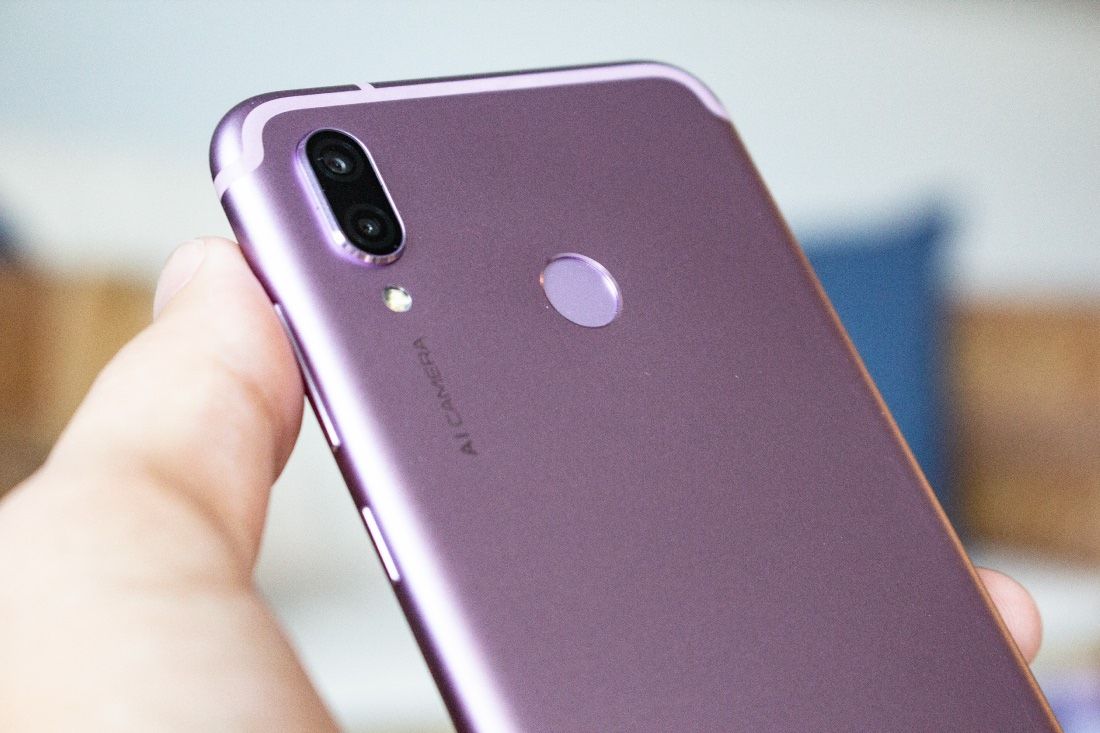
The AI camera feature that is found on the Honor 10 makes another appearance in the Honor Play.
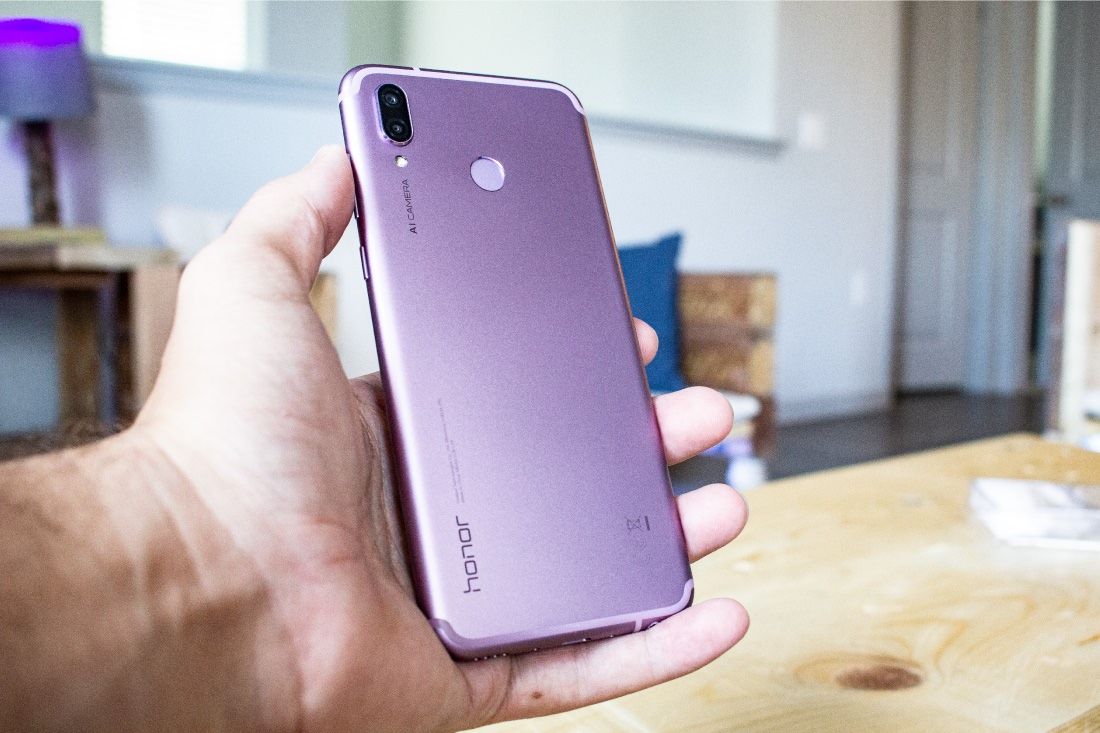
This Honor Play is the Violet color option. There are also Navy Blue and Midnight Black colors.

While this feature was not a part of the marketing to push the Honor Play, my favorite thing about this phone is the display. The 6.3″ display has a unique aspect ratio of 19.5:9. This gives you a taller screen than the 19:9 display from the Honor 10. This extra bit of screen space adds a lot to your media consumption. Movies are shown closer to their source ratio and games give you a wider field of view. Even when it comes to the UI, more of what's on your phone will be visible.
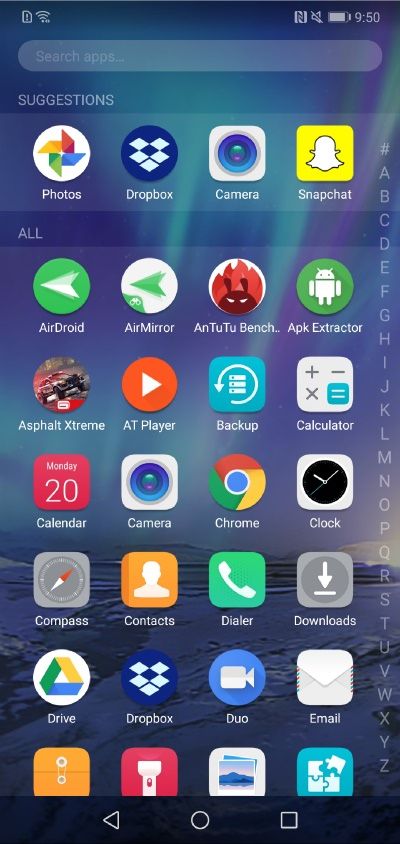
Honor 10 App Drawer

Honor Play App Drawer

These two screenshots show the app drawers from the Honor 10 and the Honor Play. Notice how the extra 60 pixels on the Honor Play show you the titles from the 6th row of apps, when they're cut off on the Honor 10. It's a small detail, but adds a lot to the user experience.

The Honor Play features a taller 19.5:9 aspect ratio display.

This is the first Honor device to feature EMUI 8.2 at launch. There isn't much that is different from EMUI 8.1, but the software is getting a little better with each update. You'll still find the massive amount of security and management features that you're used to in other Honor phones.

The Honor Play features a 6.3″ display with a 1080x2340p resolution.

One of the best updates in EMUI 8.2 is the overhaul of the camera app. All of the camera modes are now laid out on a grid, make everything much easy and quicker to navigate.
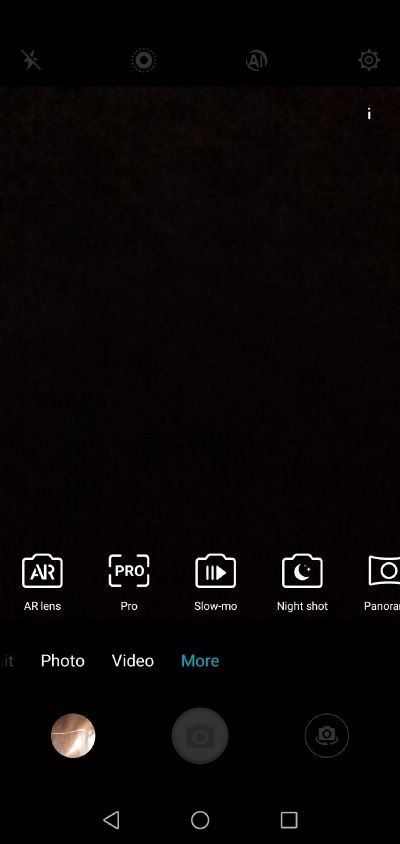
EMUI 8.1 Camera App (Honor 10)
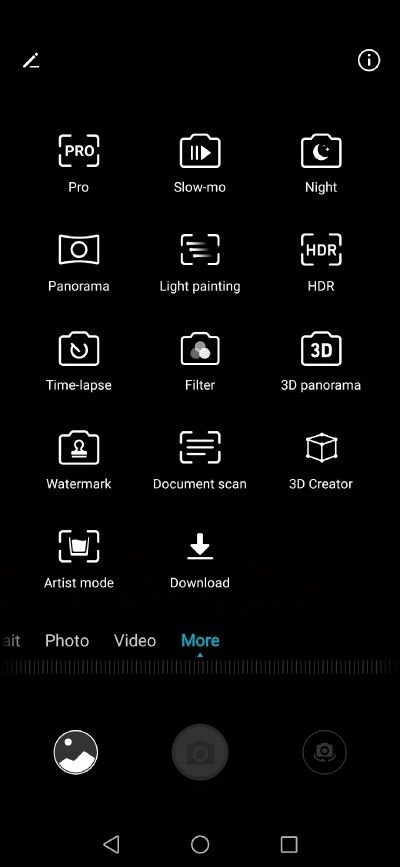
EMUI 8.2 Camera App (Honor Play)

There's a lot to talk about when it comes to the Honor Play. We will go over gaming performance, camera quality, the display, and much more in our full video review.

Buy the Honor Play
We thank Honor for sponsoring this post. Our sponsors help us pay for the many costs associated with running XDA, including server costs, full time developers, news writers, and much more. While you might see sponsored content (which will always be labeled as such) alongside Portal content, the Portal team is in no way responsible for these posts. Sponsored content, advertising and XDA Depot are managed by a separate team entirely. XDA will never compromise its journalistic integrity by accepting money to write favorably about a company, or alter our opinions or views in any way. Our opinion cannot be bought.


from xda-developers https://ift.tt/2Nf0sIh
via IFTTT